


ElevenLabs: AI Voice Generator
4.71.39K Reviews
App Specs
- Version
- 0.0.109
- Updated On
- License
- Free
- Downloads
- 10,000,000+
- Developer
- Eleven Labs Inc
- Categories
- Music & Audio
- Platform
- Android
Screenshots
 Analysis by AppCompare
If you've ever wanted to take your creative projects to the next level with some killer voiceovers, let me introduce you to ElevenLabs: AI Voice Generator. This app is a game-changer for anyone looking to add a professional touch to their audio content without breaking the bank.
Where a voiceover fits into a real day
I can see this app being most useful when a creator has a finished script but no quiet room, microphone, or time to record several takes. For example, you might write a short explainer after work, generate narration on your phone, then bring the audio into a separate video editor later. That division of labor is practical: the app handles spoken delivery, while editing, captions, music, and final pacing remain part of your usual production workflow.
It also makes sense for educators preparing short lesson material, podcasters testing a draft, and small teams that need a consistent narrated version of written content. I would treat generated speech as a production option rather than a replacement for every human voice. Personal stories, interviews, and performances that depend on a speaker’s real identity or spontaneous emotion can benefit more from recording a person directly.
Connectivity is part of the workflow
Because this is an AI voice-generation app, I would plan to use it when I have a dependable connection, especially for the step that turns text into speech. A weak signal can interrupt a creative session or make it harder to tell whether a request is still processing, so I would avoid leaving a last-minute voiceover until I am on a crowded or unreliable network. I also would not assume that a generated file will be available offline unless I have confirmed that in my own setup.
A useful habit is to keep the script in a separate notes or writing app before opening the generator. That way, a connection hiccup does not put the only copy of your work at risk, and you can return to the text without reconstructing it. I would generate a short test passage first, listen to it, and only then submit a longer script. This catches awkward pronunciation or pacing early and avoids spending time processing material that needs a rewrite.
Choosing between AI speech and familiar alternatives
Compared with recording yourself on a phone, an AI voice can save retakes and help keep a series of clips sounding consistent. Compared with desktop text-to-speech tools, a mobile app is convenient when the script is already on hand and you want to explore a voice quickly. But if you need detailed mixing, precise timeline edits, or a complete podcast production environment, a dedicated audio editor is still the better place to finish the job.
I would also compare the result with a simple human recording before settling on it. A generated narrator can work well for instructional material or a straightforward product walkthrough, while a real speaker may feel more trustworthy in a personal appeal. The right choice depends less on whether AI speech sounds impressive and more on whether its delivery suits the message and the audience.
Worth Reading Before You Choose

Flipboard Shows What News Apps Must Do Beyond the Feed

Switching to Android Auto Means Rethinking Your Driving Routine

Google Calendar Makes a Crowded Week Easier to Manage

Ludo King Makes the Most of the Minutes Between Plans

Baby Panda World Brings Quick Play to Modern Phones, but Its Game Library Feels Busy

ESPN’s Live Game View Makes Following Close Games Easier
First Impressions
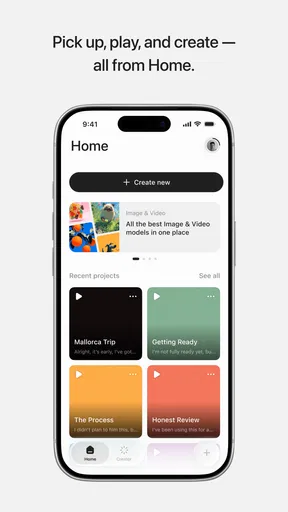
When you first open ElevenLabs: AI Voice Generator, you'll notice its sleek and intuitive interface. It's designed with ease of use in mind, making it accessible for anyone—from tech newbies to seasoned sound engineers. Right off the bat, I was impressed by how user-friendly it was. You don’t need a degree in audio engineering to figure this one out.
It is a free app in the Music & Audio category from Eleven Labs Inc, and its Everyone age rating makes it approachable for a broad audience. Its 4.7 average across around 61 thousand ratings and more than one million installs suggest that many people have tried it, though I would still judge it by whether its voice style suits your own work. The current version is 0.0.60, and it requires Android 7.0 or newer. The app is free to install, with optional in-app purchases ranging from around $22 to $219 per item, so I would check the purchase details before building a regular workflow around it.
Features That Stand Out
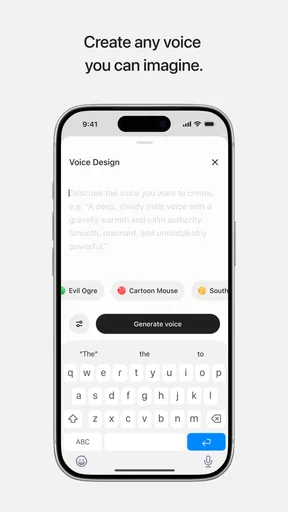
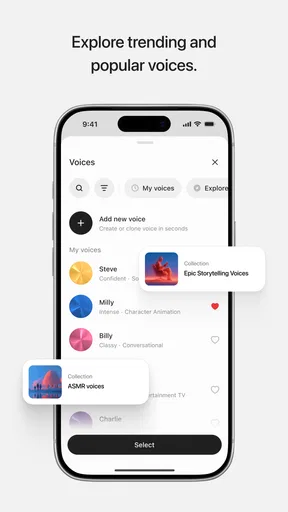
One of the best things about this app is its diverse selection of voices. You can choose from a range of tones and accents, ensuring you get the perfect voice for your project. Whether you need a soothing narrator for a meditation app or an upbeat voice for an explainer video, this app has got you covered.
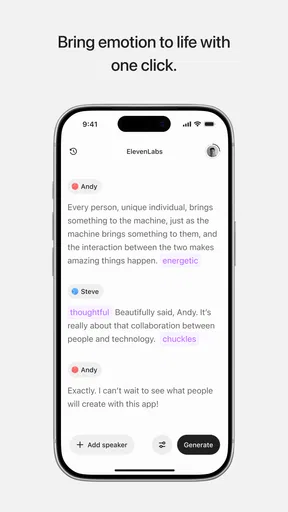
The real magic happens when you start tweaking the voice settings. Want to add a bit more emotion or adjust the speed? No problem. The app's flexibility blew me away. You can fine-tune the voice to sound just right, making it feel almost human-like, which is no small feat for AI.
For better results, I would edit a script for the ear rather than paste in a page written for reading. Shorter sentences, clear punctuation, and spelled-out abbreviations can make narration easier to follow. I would also listen for names, specialist terms, and numbers instead of assuming the first pass gets every pronunciation right. A small correction to the wording may be more effective than repeatedly adjusting a voice setting.
Getting Down to Business
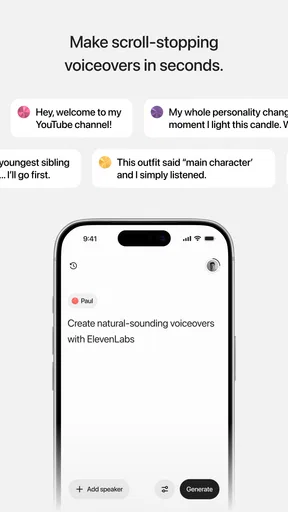
Using the app is as straightforward as it gets. Simply type in your text and let the AI work its magic. Within seconds, you'll have a polished audio file ready to go. I tested it with a variety of scripts, and each time, the results were spot on. The clarity and quality of the audio are top-notch, making it ideal for podcasts, videos, and even audiobooks.
One thing I particularly appreciated was the ability to save and export files in multiple formats. This means you can easily integrate them into whatever project you're working on, whether it's a video editing software or a simple audio player.
For a mobile workflow, I would divide a long narration into meaningful sections instead of treating a whole chapter as one block. That makes it easier to replace a paragraph when the script changes and to spot a weak passage without replaying everything. Before exporting, I would listen once at the pace a viewer or listener will actually hear it; a voice that sounds convincing in a quick preview may feel too fast or too polished over several minutes.
If a generation stalls, I would first check the connection and try a short passage again rather than repeatedly sending the entire script. Keeping the source text outside the app gives you a safe recovery point, and saving finished sections as you go limits the amount of work you need to repeat. For a deadline, leaving room for a final listen and export is wiser than assuming every network request will finish immediately.
Why You’ll Love It
What sets ElevenLabs apart from other voice generators is its attention to detail and commitment to quality. The voices don't sound robotic or monotonous; they have a natural flow that’s really hard to come by in AI-generated speech.
Plus, the app is constantly updating and improving. The developers are clearly dedicated to enhancing the user experience, which is always a good sign. They even offer customer support to help you out if you run into any issues—something that’s often lacking in tech apps these days.
There is a trade-off between convenience and control. This is a focused way to turn text into narration, not a substitute for a full recording booth or a desktop audio workstation. If you need to direct every pause, layer several speakers, or shape a performance around a very specific emotional beat, recording and editing with dedicated tools may give you more dependable control. For quick narration, though, the app can remove much of the setup that otherwise slows a project down.
I would also be deliberate about what text I send for generation. Drafting and proofreading before submitting helps reduce unnecessary retries, particularly when I am using a mobile connection. A brief sample is a good check for tone and pronunciation, while a final review of the exported audio helps catch errors that are easy to miss when reading the script silently.
Final Thoughts
In a world where content is king, having a tool like ElevenLabs: AI Voice Generator at your disposal is invaluable. It’s perfect for content creators, educators, marketers, and anyone else who needs high-quality voiceovers without the hassle.
So, if you're in the market for a reliable, easy-to-use voice generator that delivers exceptional results, give this app a shot. You might just find it becomes an indispensable part of your creative toolkit.
Happy creating!
My recommendation comes with a clear condition: it is best for people who are comfortable preparing text, checking the spoken result, and working around a network-dependent process. If you want to record a personal voice, need a full editing suite, or cannot rely on a connection when generating, a recorder or desktop tool may be the more suitable choice. For creators who want to turn a finished script into narration without setting up a microphone, this is a convenient place to start.
Pros
- High-quality voice synthesis.
- Wide range of voice options.
- User-friendly interface.
- Fast processing times.
- Customizable voice settings.
Cons
- Limited free version features.
- Requires internet connection.
- Occasional pronunciation errors.
- Subscription can be pricey.
- Not all accents available.
FAQs for ElevenLabs: AI Voice Generator
What platforms does the ElevenLabs: AI Voice Generator support?
ElevenLabs: AI Voice Generator is available on both Android and iOS platforms. It can be downloaded from the Google Play Store for Android devices and the Apple App Store for iOS devices. The app is optimized to run smoothly on most smartphones and tablets, ensuring a seamless user experience.
Can I customize the voices generated by ElevenLabs?
Yes, ElevenLabs allows users to customize the AI-generated voices extensively. You can adjust parameters such as pitch, speed, and tone to create a voice that suits your needs. Additionally, the app offers a range of preset voices, each crafted to provide different styles and emotions.
Is internet access required to use ElevenLabs?
ElevenLabs requires an internet connection to access its AI voice generation features. The app processes voice requests on its servers, ensuring high-quality output. However, once a voice is generated, you can save and access it offline, making it convenient for various uses without needing a constant connection.
Are there any subscription fees for using ElevenLabs?
ElevenLabs offers both free and premium subscription options. The free version provides basic voice generation features with some limitations, while the premium subscription unlocks advanced features, additional voice customization, and higher processing limits. Pricing details and subscription plans can be found directly within the app.
How secure is my data when using ElevenLabs?
ElevenLabs prioritizes user privacy and data security. The app employs encryption protocols to protect user data and ensures that voice files are stored securely. Additionally, the app complies with relevant data protection regulations, giving users peace of mind regarding their personal information.


